Sandooq Lite, an offline POS for Android
Sandooq Lite is an offline point-of-sale app for small shops that use one Android phone at the counter. Record sales, track stock and check the day’s total in English or Arabic.
Get it on Google PlayFree to download. No account or ads.
Run your shop counter from one phone
Ring up a sale
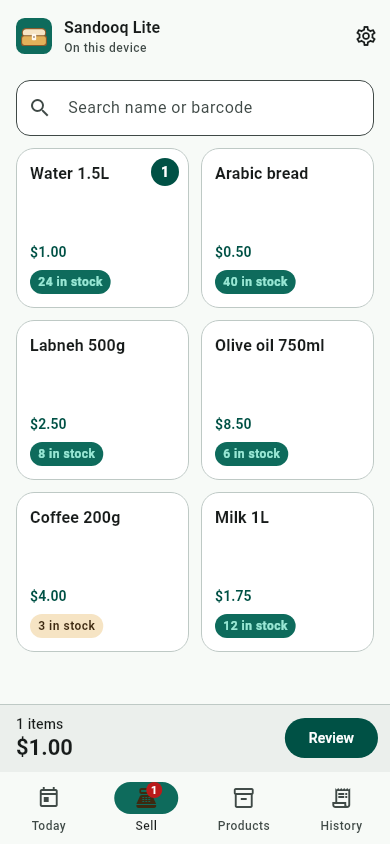
Find a product by name or barcode, tap it into the cart and review the quantities and total before confirming the sale.
See what’s left on the shelf
Add items with a price and the quantity on hand. Each confirmed sale deducts the units sold. The Today screen shows products running low.
Check sales at closing time
See the day’s sales total and transaction count in Today. Open History to see what sold and check the total of a completed sale.
Sandooq Lite questions
- Does Sandooq Lite work without internet?
- Yes. Once Sandooq Lite is installed, you can add products, record sales and check your stock or sales history without Wi-Fi or mobile data. The Android app keeps those records on the phone and you can open it without signing in.
- Will my products and sales move to a new phone?
- Sandooq Lite stores products and sales on the phone where you entered them. Android cloud backup and device-to-device transfer are disabled for this app, so installing it on another phone starts with an empty shop. Uninstalling it erases its local data.
- Can I scan a product barcode with the phone camera?
- Barcode lookup in Sandooq Lite uses codes you enter by hand. Save a barcode or SKU when you add a product, then type the code in the Sell screen to find the item. You can also search by the product name.
- What happens to recorded sales if I change currency?
- In Settings you can choose USD, LBP, AED or SAR. Completed sales keep the currency selected at the time of sale. New sales use the new currency. Lite does not convert catalogue prices at an exchange rate, so review your product prices before recording the next sale.
Which Sandooq POS fits your shop?
- One counter and one Android phone
- Choose Lite if the phone stays at the counter and you check stock and sales on that same device. Each sale updates the shelf quantity, and you can read the day’s total there after closing. You can use Lite without a Sandooq subscription.
- A team, more tills or more branches
- Choose the connected POS when cashiers need their own permissions or you want to check sales across branches from a dashboard. Once the tills sync, you can review their sales together. Use the price calculator to estimate the cost for your stores and staff logins.